
Real-World Implementation of Single Table Design in AWS DynamoDB
Trupti Panchal

Introduction
Use Case: Manufacturing Quality Control System
We’re building a Work Order (WO)-driven system to manage production quality control. The system will support both quality managers and floor technicians with tailored access via web and mobile platforms. It needs to efficiently handle data related to users, WOs, measurement tools, and quality standards – all with low latency and high scalability.
Problem Statement
Design a system to manage interactions between quality managers, technicians, measurement devices, and WO data, supporting fast, role-specific access patterns.
- Quality Managers: Create and manage technicians, Schedule and assign WOs to production lines, Track devices and Generate quality reports from WO results
- Technicians:Execute WOs using calibrated devices,Record product measurements against WO specifications,Upload WO completion data for manager review
- Devices: Require tracking for calibration status and maintenance cycles
- Metadata: Defines WO test parameters (tolerances, test methods),Classifies defect types for WO analysis
What is Single Table Design (STD) in DynamoDB?
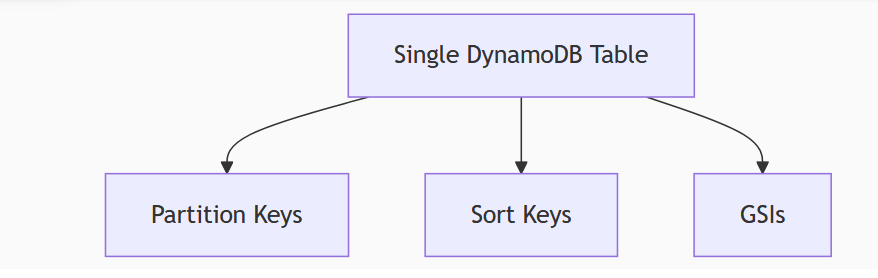
Single Table Design (STD) is a strategy where all entities in your application—such as users, devices, work orders, and metadata—are stored in a single DynamoDB table. Instead of creating a separate table for each entity, you design your keys and indexes around how your application accesses the data, not how it’s structured logically.
Key Concepts
- Shared Table: All data types (users, devices, etc.) live in one table.
- Access Pattern–First Design: Keys and indexes are structured based on how data is queried.
- Composite Keys: Every item uses a combination of a partition key (PK) and sort key (SK) to uniquely identify and organize data.
- Entity Prefixing: Prefixes like USER# or DEVICE# are used in keys to avoid collisions and make querying easier.
- Global Secondary Indexes (GSIs): Additional indexes let you query data in multiple ways.
Why AWS Recommends Single Table Design
AWS advocates for STD in DynamoDB to:
- Reduce the number of read/write operations needed to join or aggregate data.
- Improve query performance by minimizing the number of round-trips to the database.
- Simplify data modeling for real-time applications.
- Leverage the high throughput and scalability of DynamoDB efficiently with well-designed keys and indexes.
- Enable atomic operations across related items using DynamoDB transactions.
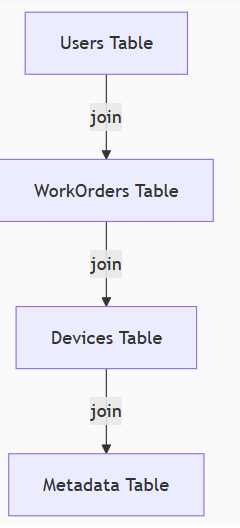
The Traditional Approach (Multi-Table)
Our Single Table Solution
Designing the Schema Based on Access Patterns
Step 1: Identify the Core Entities
- Users (Quality Manager, Technicians)
- Devices
- Work Orders (WOs)
- Metadata Tolerances, Test Methods, Defects
Step 2: Primary Key Design (PK/SK)
| Entity | PK | SK |
|---|---|---|
| Users | USER#<username> | USER#<username> |
| Work Orders | WO#<WO-id> | USER#<username> |
| Devices | DEVICE#<device-id> | USER#<username> |
| Metadata | METADATA#<type> | METADATA#<specific value> |
Step 3: Global Secondary Indexes (GSIs)
| GSI | PK | SK | Use Case |
|---|---|---|---|
| GSI1 | USER#<username> | TECHNICIANS#<username> | List & sort technicians |
| GSI2 | PROJECT#<project-id> | WO#<WO-id> | List WOs under a project |
| GSI3 | USER#<username> | WO#<WO-id> | List/sort WOs by user |
Step 4: Access Pattern Mapping
Below is a breakdown of how the access patterns map to our schema:
| App | Access Pattern | PK | SK | GSI |
|---|---|---|---|---|
| Manager-Web | Get manager-user with username - Edit | USER#<username> | USER#<username> | N/A |
| Manager-Web | List all Technician-users | USER#<username> | TECHNICIANS#<username> | GSI1 |
| Manager-Web | Sort by Technician-user username | USER#<username> | TECHNICIANS#<username> | GSI1 |
| Manager-Web | Sort by certificate expiry/type/status | USER#<username> | TECHNICIANS#<username> | GSI1 |
| Manager-Web | Get Technician-user with username - Edit | USER#<username> | USER#<username> | N/A |
| Manager-Web | List all devices | DEVICE#<device-id> | USER#<username> | N/A |
| Manager-Web | Sort devices by model/serial/user | DEVICE#<device-id> | USER#<username> | N/A |
| Manager-Web | Get device with device-id - Edit | DEVICE#<device-id> | USER#<username> | N/A |
| Manager-Web | List work orders and filter by Project | PROJECT#<project-id> | WO#<WO-id> | GSI2 |
| Manager-Web | Get WO based on WO-id | WO#<WO-id> | USER#<username> | N/A |
| Technician App | Get Technician-user | USER#<username> | USER#<username> | N/A |
| Technician App | List all WO, filter by user | USER#<username> | WO#<WO-id> | GSI3 |
| Technician App | Get WO based on WO-id | WO#<WO-id> | USER#<username> | N/A |
| Technician App | List meta data (tolerance, test methods) | METADATA#<type> | METADATA#<specific value> | N/A |
Step 5: Example Data Model
- User (Manager / Technician):
- PK: USER#johndoe
- SK: USER#johndoe
- Type: Technician
- Status: Active
- CertificateExpiry: 2026-12-31
- Work Order (WO):
- PK: WO#12345
- SK: USER#johndoe
- ProjectID: P123
- ScheduledDate: 2025-03-10
- Status: Pending
- Device:
- PK: DEVICE#D123
- SK: USER#johndoe
- Model: M-001
- SerialNumber: SN12345678
- Metadata (Tolerance):
- PK: METADATA#TOLERANCE
- SK: METADATA#TOL_025
| PK | SK | Type | Name | Role | Status | CertificateExp | ProjectID | ScheduledDate | Model | SerialNum | Description | GSI1PK | GSI1SK | GSI2PK | GSI2SK | GSI3PK | GSI3SK |
|---|---|---|---|---|---|---|---|---|---|---|---|---|---|---|---|---|---|
| USER#manager001 | USER#manager001 | Manager | Alice Lee | Manager | Active | N/A | |||||||||||
| USER#manager002 | USER#manager002 | Manager | David Kim | Manager | Active | N/A | |||||||||||
| USER#tech001 | USER#tech001 | Technician | Bob Smith | Technician | Active | 2026-12-31 | USER#manager001 | TECHNICIANS#tech001 | |||||||||
| USER#tech002 | USER#tech002 | Technician | Jenny Lopez | Technician | Suspended | 2025-11-15 | USER#manager001 | TECHNICIANS#tech002 | |||||||||
| USER#tech003 | USER#tech003 | Technician | John Lopez | Technician | Active | 2025-11-15 | USER#manager001 | TECHNICIANS#tech003 | |||||||||
| DEVICE#D100 | USER#tech001 | Device | InUse | ABC-1000 | SN100-A | ||||||||||||
| DEVICE#D101 | USER#tech002 | Device | Calibrating | XYZ-2000 | SN200-B | ||||||||||||
| DEVICE#D102 | USER#tech003 | Device | Available | ABC-2000 | SN300-C | ||||||||||||
| DEVICE#D103 | USER#tech001 | Device | Maintenance | XYZ-2000 | SN400-D | ||||||||||||
| DEVICE#D104 | USER#tech003 | Device | InUse | ABC-1000 | SN500-E | ||||||||||||
| WO#WO001 | USER#tech001 | WorkOrder | Pending | P001 | 2025-03-10 | PROJECT#P001 | WO#WO001 | USER#tech001 | WO#WO001 | ||||||||
| WO#WO002 | USER#tech002 | WorkOrder | Complete | P002 | 2025-02-28 | PROJECT#P002 | WO#WO002 | USER#tech002 | WO#WO002 | ||||||||
| WO#WO003 | USER#tech003 | WorkOrder | Pending | P003 | 2025-04-01 | PROJECT#P003 | WO#WO003 | USER#tech003 | WO#WO003 | ||||||||
| WO#WO004 | USER#tech003 | WorkOrder | InProgress | P001 | 2025-04-15 | PROJECT#P001 | WO#WO004 | USER#tech003 | WO#WO004 | ||||||||
| WO#WO005 | USER#tech001 | WorkOrder | Cancelled | P004 | 2025-03-20 | PROJECT#P004 | WO#WO005 | USER#tech001 | WO#WO005 | ||||||||
| METADATA#TOLERANCE | METADATA#TOL_025 | TOLERANCE | Standard Tolerance | ||||||||||||||
| METADATA#TOLERANCE | METADATA#TOL_001 | TOLERANCE | Precision Tolerance | ||||||||||||||
| METADATA#TEST_METHOD | METADATA#PullTest | TEST_METHOD | Adhesion pull test method | ||||||||||||||
| METADATA#TEST_METHOD | METADATA#DropTest | TEST_METHOD | Impact drop test |
Step 6: Querying the Data
1. Get Technicians User Profile
Use Case: Technician logs into the app; we want their profile.
- PK: USER#tech001
- SK: USER#tech001
- Query: Query using PK = USER#tech001 AND SK = USER#tech001
{
“KeyConditionExpression”: “PK = :pk AND SK = :sk”,
“ExpressionAttributeValues”: {
“:pk”: “USER#tech001”,
“:sk”: “USER#tech001”
}
}
2. List All Work Orders for a Specific Technician
Use Case: Technician sees their assigned WOs.
- GSI3 PK: USER#tech001
- SK begins_with: WO#
{
“IndexName”: “GSI3”,
“KeyConditionExpression”: “PK = :pk AND begins_with(SK, :skprefix)”,
“ExpressionAttributeValues”: {
“:pk”: “USER#tech001”,
“:skprefix”: “WO#”
}
}
3. List Work Orders Under a Project
Use Case: Manager filters WOs by project.
- GSI2 PK: PROJECT#P001
- SK begins_with: WO#
{
“IndexName”: “GSI2”,
“KeyConditionExpression”: “PK = :project AND begins_with(SK, :wo)”,
“ExpressionAttributeValues”: {
“:project”: “PROJECT#P001”,
“:wo”: “WO#”
}
}
Users (Admins & Inspectors)
| PK | SK | Type | Name | Role | Status | LicenseExp |
|---|---|---|---|---|---|---|
| USER#admin001 | USER#admin001 | Admin | Alice Lee | Admin | Active | N/A |
| USER#admin002 | USER#admin002 | Admin | David Kim | Admin | Active | N/A |
| USER#insp001 | USER#insp001 | Inspector | Bob Smith | Inspector | Active | 2026-12-31 |
| USER#insp002 | USER#insp002 | Inspector | Jenny Lopez | Inspector | Suspended | 2025-11-15 |
Devices
| PK | SK | Type | Model | SerialNum | Status |
|---|---|---|---|---|---|
| DEVICE#D100 | USER#insp001 | Device | XRF-1000 | SN100-A | InUse |
| DEVICE#D101 | USER#insp002 | Device | XRF-2000 | SN200-B | Calibrating |
| DEVICE#D102 | USER#insp003 | Device | XRF-2000 | SN300-C | Available |
| DEVICE#D103 | USER#insp001 | Device | XRF-2000 | SN400-D | Maintenance |
| DEVICE#D104 | USER#insp003 | Device | XRF-1000 | SN500-E | InUse |
Work Orders (WOs)
| PK | SK | Type | ProjectID | Status | ScheduledDate |
|---|---|---|---|---|---|
| WO#WO001 | USER#insp001 | WorkOrder | P001 | Pending | 2025-03-10 |
| WO#WO002 | USER#insp002 | WorkOrder | P002 | Complete | 2025-02-28 |
| WO#WO003 | USER#insp003 | WorkOrder | P003 | Pending | 2025-04-01 |
| WO#WO004 | USER#insp003 | WorkOrder | P001 | InProgress | 2025-04-15 |
| WO#WO005 | USER#insp001 | WorkOrder | P004 | Cancelled | 2025-03-20 |
GSI Entries (e.g., for Project and User Work Order Indexing)
| PK | SK | GSI Use Case | Notes |
|---|---|---|---|
| PROJECT#P001 | WO#WO001 | GSI2 | WO#WO001 under P001 |
| PROJECT#P001 | WO#WO004 | GSI2 | WO#WO004 under P001 |
| USER#insp001 | WO#WO001 | GSI3 | All WOs for insp001 |
| USER#insp001 | WO#WO005 | GSI3 | All WOs for insp001 |
| USER#insp003 | WO#WO004 | GSI3 | All WOs for insp003 |
Metadata (Room Types, Substrates, etc.)
| PK | SK | Type | Description |
|---|---|---|---|
| METADATA#ROOMTYPE | METADATA#Kitchen | RoomType | Kitchen area |
| METADATA#ROOMTYPE | METADATA#Bathroom | RoomType | Bathroom area |
| METADATA#SUBSTRATE | METADATA#Concrete | Substrate | Concrete construction |
| METADATA#SUBSTRATE | METADATA#Wood | Substrate | Wood substrate |
| METADATA#COMPONENT | METADATA#WallPanel | Component | Wall panel material |
- Query Inspector Users Sorted by License Expiry: Using GSI1, query all users with the “Inspector” type and sort by license expiry.
- Get All Work Orders for a Project: Using GSI2, list all work orders under a particular project ID and apply filters as necessary.
- Get Devices for a User: Query by USER#<username> as the partition key and sort by device ID.
Lessons Learned
Pros
- Blazing-fast queries: With access-pattern-based keys and no joins, query latency is incredibly low.
- Simplified scaling: DynamoDB’s architecture handles throughput spikes and high concurrency with ease.
- Cost-effective: You pay for what you use—queries, reads, and writes—without managing multiple tables or servers.
Challenges
- Steep learning curve: Designing a single-table schema requires you to know your access patterns before you write your first line of code.
- Debugging complexity: With all data types in one table, naming conventions and key discipline are critical to avoid chaos.
When to Use (and When Not to Use) Single Table Design
When It Makes Sense
- Well-defined access patterns: Ideal when you know exactly how data will be queried.
- High-performance needs: Perfect for apps that require low-latency responses and scalability.
- Minimizing joins: Works great if your data is related and you want to reduce complex joins.
- Tightly linked entities: Best when entities (e.g., users, devices) share strong relationships.
When It’s Not Ideal
- Evolving data access patterns: Avoid if your app is still figuring out how data will be queried.
- Complex relational queries: Not suitable if you rely on complex joins and foreign keys.
- Independent data types: If entities don’t interact much, separate tables might be simpler.
- Frequent ad-hoc querying: Limited flexibility for exploratory or analytical queries.
Conclusion
Single Table Design in DynamoDB is a powerful strategy that simplifies data modeling while optimizing performance for real-time applications. By unifying all data into a single table and designing keys and GSIs around your application’s access patterns, you can significantly improve query efficiency, reduce operational complexity, and better align with how DynamoDB is built to scale.
AWS recommends this approach because it embraces access-pattern-first design, making your application leaner, faster, and more scalable in the long run.